Every time I needed a quick sum while taking notes I ended up in the same silly dance: leave the note, open a calculator, tap the number in, remember the answer, come back, type it out. TextCalc removes that trip entirely. It is a calculator disguised as a notebook, and you never have to decide which one you are using: you just write, and the maths on the page works out.
One document, prose and numbers together
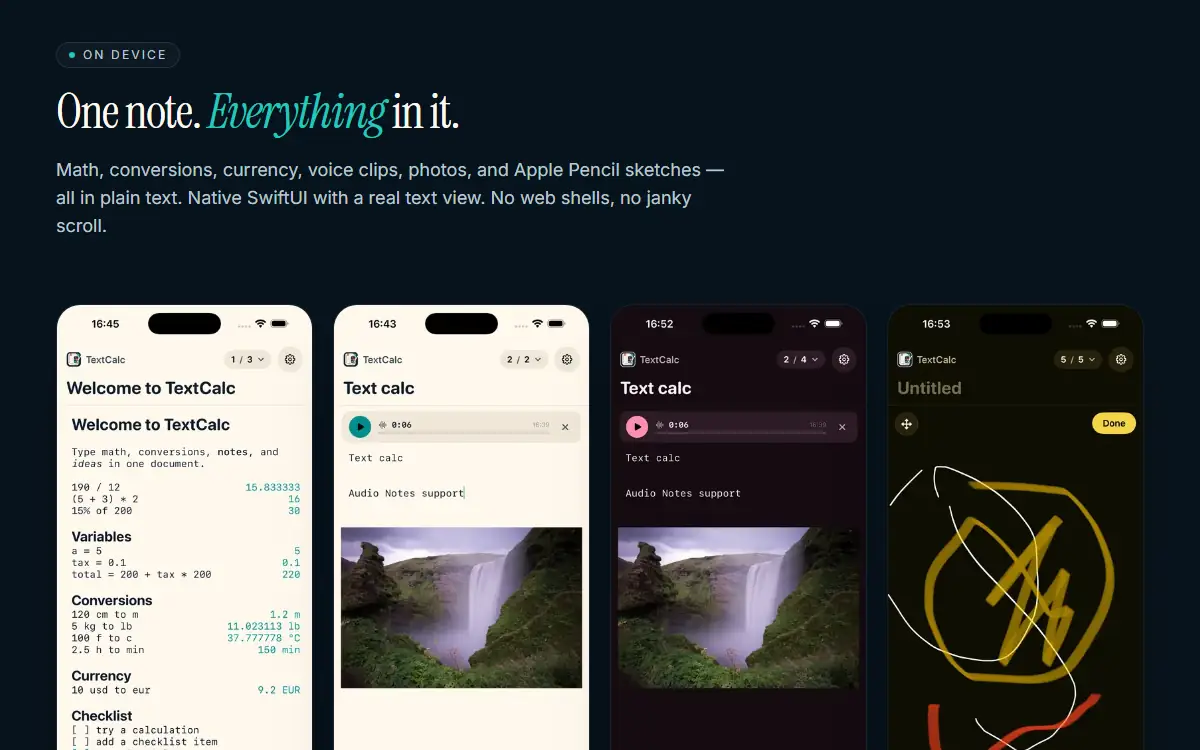
Write people = 12 on one line, people * perHead a few lines down, and the result appears at the end of the line while you keep typing around it. There is a full parser behind it — the usual operators, parentheses, percentages written the way you would actually say them (15% of 200, 200 + 15%), and variables you set once and reuse anywhere in the note. Unit conversions come from the same parser, so 5 ft to cm, 100 f to c and 1500 mb to gb all just resolve, across length, weight, temperature, time, volume and data. Currency is live, converting between major ISO codes with rates refreshed in the background and a cached snapshot so it still works with no signal.

Still a real notebook
None of this comes at the expense of the writing. Markdown styles in place — headings, bold, italic, code and lists restyle as you type, with no preview pane to flick to. Checkboxes are tappable, bullets and numbered lists behave properly, and a note can hold voice clips, photo attachments and Apple Pencil sketches alongside the text. Because it is native SwiftUI with a real text view rather than a web shell, Apple Intelligence Writing Tools rewrite, proofread and summarise any selection on supported devices, and scrolling stays smooth in a long note. On iPad you get a split-view sidebar; on iPhone a swipeable pager. There are day and night themes for both.
Where to find TextCalc
TextCalc lives at textcalc.app and runs on iPhone and iPad with iOS 17 or later. It is free to start with one note and the calculator in plain text, and TextCalc Pro is a $5.99 one-time purchase — no subscription, no renewals — that unlocks unlimited notes, Markdown formatting, live currency, media attachments and the Apple Intelligence tools across every device on the same Apple ID.